
All the effort you put in as a Poppo Live host or agent should translate into a seamless payout experience. In this guide, we’ll walk you through the Poppo Live withdrawal process from start to finish, cover the most common issues you might encounter along the way, and share a few frequently common questions answers to make the whole thing as smooth as possible.
Withdrawal Requirements
- Completed Face Verification
First, face verification is a mandatory requirement for both hosts and agents. Hosts must complete it before going live, while agents need it done before they can process any withdrawals. If you haven’t done it yet, check out our full face verification guide to get it sorted.
- Verified Email or Phone Number
Second, you’ll also need a verified email address or phone number linked to your Poppo Live account. Head to your profile and confirm that your contact details are already bound to the app before moving forward.
- Minimum Withdrawal Amount
Then, make sure your balance has reached the minimum withdrawal threshold of $10 USD before attempting a payout.
- Active Payment Account
Poppo Live supports withdrawals via bank transfer or e-wallet. Whichever method you prefer, ensure your payment account is active and in good standing. We’ll go over the full list of supported banks and e-wallet options later in this guide.
Poppo Live Withdrawal Tutorial
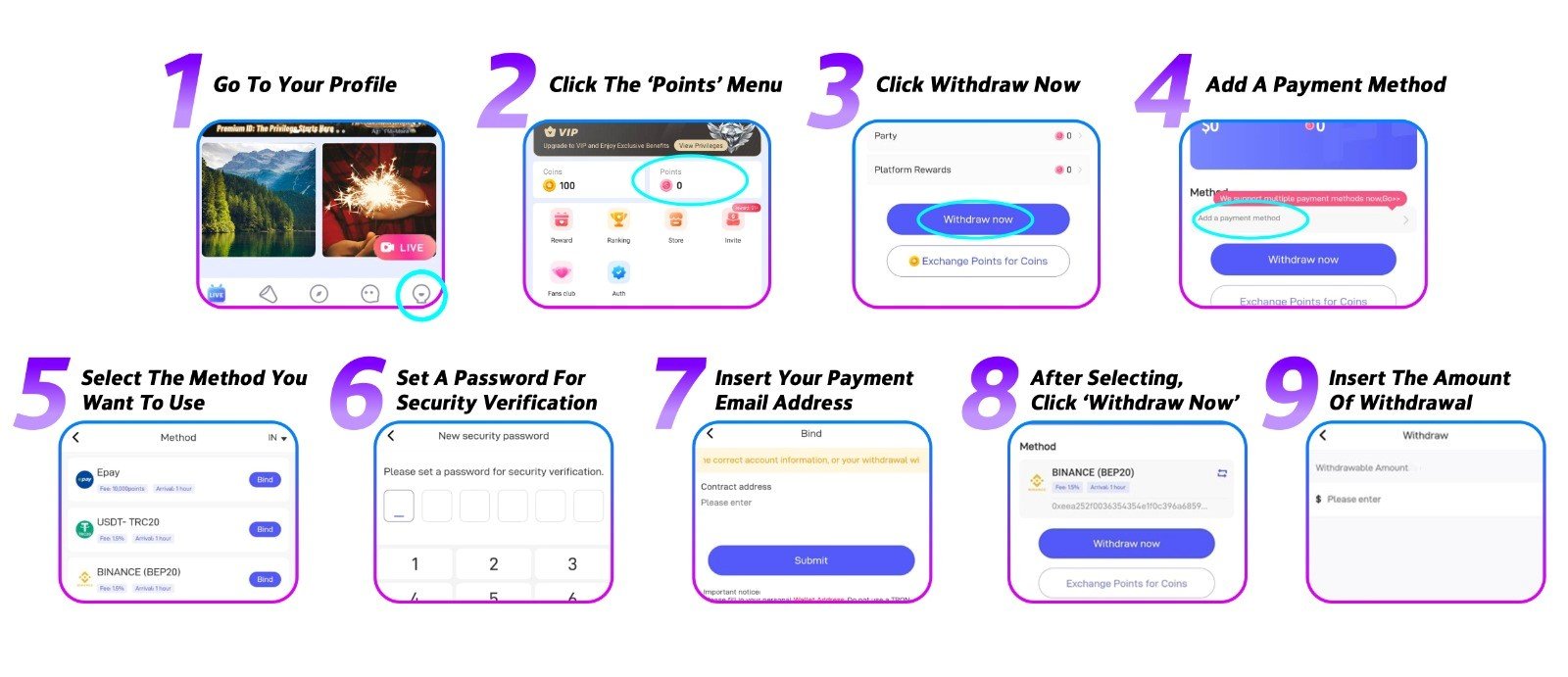
- Go to Your Profile
Open the Poppo Live app and navigate to your profile to get started. - Open the ‘Points’ Menu
From your profile, tap the ‘Points’ menu to access your earnings.
- Tap ‘Withdraw Now’
Inside the menu, you’ll see your available balance. Tap the ‘Withdraw Now’ button to proceed.
- Add a Payment Method
If this is your first withdrawal, you’ll need to set up a payment method before continuing. Tap the ‘Add a Payment Method’ button to get started.
- Select Your Preferred Payment Method
Poppo Live supports several payout options including Epay, USDT, PayPal, bank transfer, and e-wallet. Keep in mind that available payment methods may vary depending on your location.
- Create a Transaction PIN
For security purposes, you’ll need to set up a transaction PIN, this will be required every time you make a withdrawal. Avoid easy-to-guess combinations like 12345 or 11111 to keep your account secure.
- Enter Your Payout Email Address
Enter the email address linked to your payment account to bind it to your Poppo Live profile.
- Head Back to ‘Points’ and Tap ‘Withdraw Now’
With your payment account set up, return to the ‘Points’ menu and tap ‘Withdraw Now’ once more.
- Enter Your Withdrawal Amount
Enter the amount you’d like to withdraw and confirm the transaction. Once submitted, withdrawals are typically processed within up to 72 hours.
Poppo Live Withdrawal Frequently Asked Questions
- What is the minimum withdrawal amount?
The minimum withdrawal amount is
- What payment methods does Poppo Live support?
Poppo Live currently supports Epay, USDT, PayPal, bank transfer, and e-wallet. Keep in mind that available options vary by location, check the app for the full list of methods supported in your area.
- Are there any transfer fees?
It depends on the payment method you choose. Some third-party providers may charge a transfer fee, and the rate can differ from one service to another. It’s worth checking with your chosen provider beforehand.
- Can hosts withdraw their own earnings?
Absolutely. As a host, you have full control over your withdrawals and can make one whenever you’re ready.
- What if I linked the wrong payment account?
No need to panic, there are no restrictions on unlinking a payment account from your Poppo Live profile. You can remove and update your payment details at any time.
Common Issues & Solutions
- My Withdrawal Failed to Process
There are a few possible reasons for this, incorrect payment details, a suspended or inactive account, or your bank and payment method may be on our restriction list. If this happens, try switching to a different withdrawal method and contact our support team for further assistance.
- The Withdrawal Button Is Missing
This typically means one or more of the withdrawal requirements haven’t been met. Run through the checklist: make sure your face verification is complete, your email or phone number is confirmed, and that your balance has hit the minimum threshold of $10 USD.
- A Specific Payment Method Isn’t Showing Up
Certain payment options are region-dependent and may not be available in your area. Simply select from whichever methods are currently showing up as available for your location.
- My Withdrawal Is Taking Longer Than Expected
Under normal circumstances, withdrawals are processed within three business days. If yours has been pending longer than that, reach out to our support team and we’ll look into it for you.
Just a Few Taps Away
In conclusion, once everything is in order, withdrawing your earnings on Poppo Live is about as straightforward as it gets. So, whether you’re a host or an agent, the key is making sure your payment details are accurate and your preferred method is properly set up before initiating a withdrawal.
Still have questions about the Poppo Live withdrawal process or anything else on the platform? Our support team is always on hand and ready to help, don’t hesitate to get in touch or visit our blog for more tutorial.