
Now that you’re familiar with the host registration process, it’s worth knowing that Poppo Live offers another path to earning on the platform, becoming an agent. If going live isn’t quite your style, the agent route might be the better fit for you. Agents play a behind-the-scenes role, focusing on team building and recruiting talented hosts rather than performing on camera. If you have a knack for spotting talent and managing people, those skills translate directly into success as a Poppo Live agent. Ready to explore this path? Let’s start by walking through the Poppo Live agency registration requirements you’ll need to meet.
Poppo Live Agency Registration Tutorial
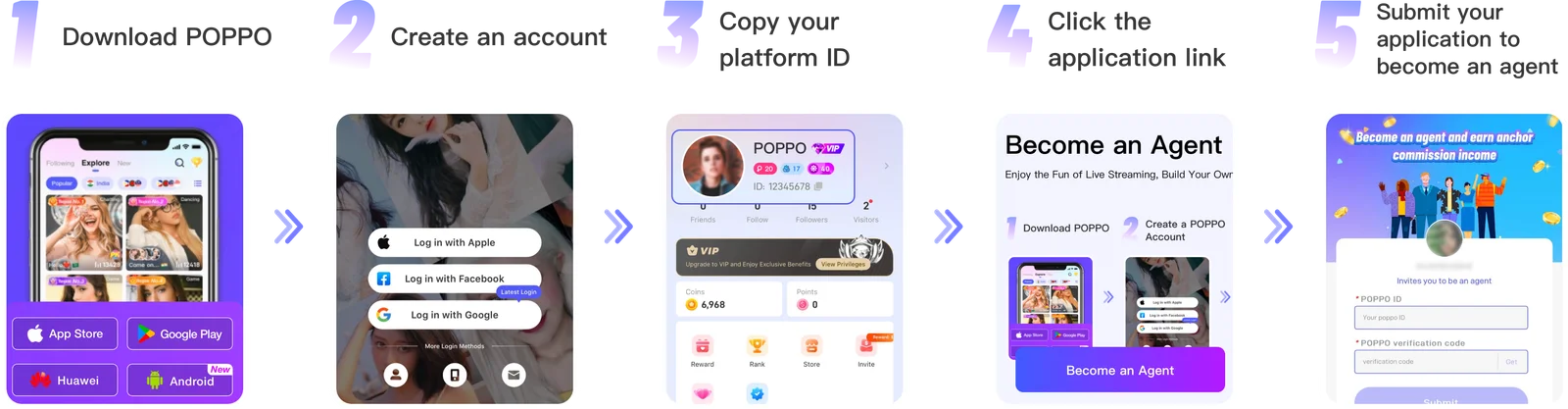
- Download the Poppo Live App
Start by tapping the link right here to install Poppo Live on your device. Once the installation is complete, open the app to get started. - Create Your Account
With the app open, proceed to register your account. You can sign up using Google, Facebook, Instagram, your email address, or phone number, whichever is most convenient for you. - Copy Your Account ID
After registration, navigate to your profile and look just below your profile picture. You’ll find your unique account ID there, copy it, as you’ll need it in the next step. - Open the Registration Link
Next, open the agency registration link provided right here. This will take you to the form where you’ll submit your application. - Submit Your Agency Registration Request
Enter your account ID into the form and click the ‘Get’ button to request a verification code. The code will be sent directly to your Poppo Live inbox, check your ‘System Message’ tab to find it. Once you have both your account ID and verification code filled in, hit ‘Submit’ to send your agency registration request.
Common Problems and How to Fix Them
- I Selected the Wrong Gender?
Unfortunately, gender can’t be changed after registration. If you made a mistake, you’ll need to create a new account with the correct information.
- I Can’t Access the Registration Link
Make sure you’re using the correct link. Our registration link works on both iOS and Android devices, so compatibility shouldn’t be an issue.
- I’m Having Trouble Uploading a Photo
During registration, you’ll need to submit an unedited, filter-free photo. Once your account is set up, you’re free to update your profile picture to any photo you like, filters and edits included.
Poppo Live Host Registration Frequently Asked Questions
- Entered the wrong username?
No worries, you can update your username anytime through your profile settings after registration.
- Signed up with the wrong email?
The verification code gets sent to whatever email you entered, so if it’s incorrect, you won’t receive it. So, your best option is to create a new account using the right email address.
- Not receiving the verification code?
This usually happens when an incorrect email or phone number was entered. If your details are correct, check your spam or junk folder. Still nothing? Try switching to a different network connection and request the code again after a few minutes.
- Can I register more than one host account on the same device?
No, each device can only be linked to one registered account.
- Is screen recording allowed on the app?
No. To protect user privacy, the app blocks screen recording entirely — for both you and anyone else watching your stream.
Getting Started with Poppo Live
In conclusion, setting up your Poppo Live agent account is quick and straightforward. If you’ve followed the steps above, you should now be fully registered and ready to dive into everything the platform has to offer, from understanding how the host-agent relationship works to exploring the different ways you can earn.Still have questions about getting started, agency features, or anything else? Visit our blog for more tutorial in the future, also our team is always happy to help, don’t hesitate to reach out anytime!