
You’ve completed your host registration, now it’s time to tackle the next step: face verification. It’s a quick and straightforward process that every host must complete before going live for the first time or making any withdrawals. Let’s go straight through on how Poppo Live face verification works and answers to a few common problems you might encounter.
Poppo Live Face Verification Guide
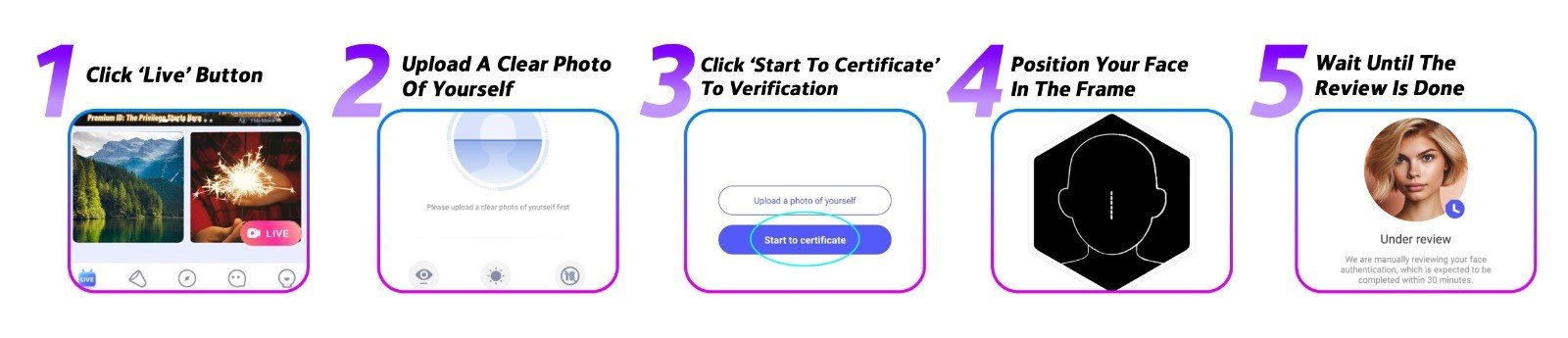
- Open the Poppo Live Homepage
Launch the Poppo Live app and head to the homepage. From there, tap the ‘Live’ button to be taken directly to the face verification section, where the entire process will take place.
- Upload a Clear Photo of Yourself
You’ll start by uploading a photo of yourself. Make sure it’s recent, well-lit, and shows your face clearly. Once you’re satisfied with the photo, tap ‘Confirm’ to proceed to the next step.
- Tap ‘Start to Certificate’ to Begin Verification
This will kick start the real-time verification stage. Make sure you’re in a comfortable, well-lit spot before tapping through.
- Follow the On-Screen Instructions
The app will guide you through each step in real time. To ensure a smooth process, keep the following in mind: find a well-lit room and avoid sitting with a light source behind you, remove any hats, glasses, masks, or accessories that cover your face, and use your front camera under clear conditions.
- Submit and Wait for Review
Once you’ve completed all the steps, submit your verification and wait for the results. Here’s what to expect: the review process typically takes one to three business days. If approved, your account will be officially verified as a host. If it doesn’t pass, you’re free to go through the verification process again.
Face Verification Common Problems & Solutions
- The App Won’t Access My Camera
First, check that Poppo Live has camera permissions enabled in your phone’s settings. Also make sure you’re running the latest version of the app. If the issue continues, try restarting your device or switching to a different phone.
- My Face Verification Is Still Under Review
Most verifications are completed within minutes, but some cases may take up to three business days if a manual review is required. If yours has been pending longer than that, don’t hesitate to reach out to our team for an update.
- My Face Verification Was Rejected
This typically happens when the recorded video doesn’t match your profile photo, or when more than one person appears in the frame during verification. Double-check that your profile picture is a clear, accurate photo of yourself and try the verification again.
Poppo Live Face Verification Frequently Asked Questions
- What happens if I don’t complete face verification?
Skipping face verification means you won’t be able to go live or withdraw any of your earnings. It’s a mandatory step for all hosts on the platform.
- What if I make a mistake during the video verification steps?
Not a problem at all, you can redo the video verification steps as many times as needed until it goes through successfully. There’s no penalty for retrying.
- Why does the app occasionally ask me to verify my face again?
Occasional re-verification is part of Poppo Live’s built-in security system, designed to keep your account safe. Whenever you’re prompted, simply complete the process to ensure your account remains in good standing.
- My face verification keeps getting rejected, what should I do?
You’re able to attempt verification several times throughout the day. If you reach the daily limit, give it 24 hours before trying again. If rejections continue despite multiple attempts, reach out to our support team and they’ll help you sort it out.
The Sooner You Verify, the Sooner You Earn
Face verification might seem like a small step, but it’s one you won’t want to put off. Without it, going live and accessing your earnings simply isn’t possible, so knocking it out early sets you up for a smooth start on Poppo Live. The process itself doesn’t take long, and with everything covered in this guide, you have everything you need to get through it without a hitch.
Have more questions about verification or anything else on Poppo Live? Our team is always just a message away, don’t hesitate to get in touch or visit our blog for more information in the future.