
As a Poppo Live agent, the hosts you recruit are the foundation of your income, so knowing how to bring them onto the platform is one of the most valuable skills you can develop. The good news is that the invitation process is simple and easy to follow. Let’s break down exactly how Poppo Live invite hosts process to join your agency works.
Poppo Live Invite Host Tutorial
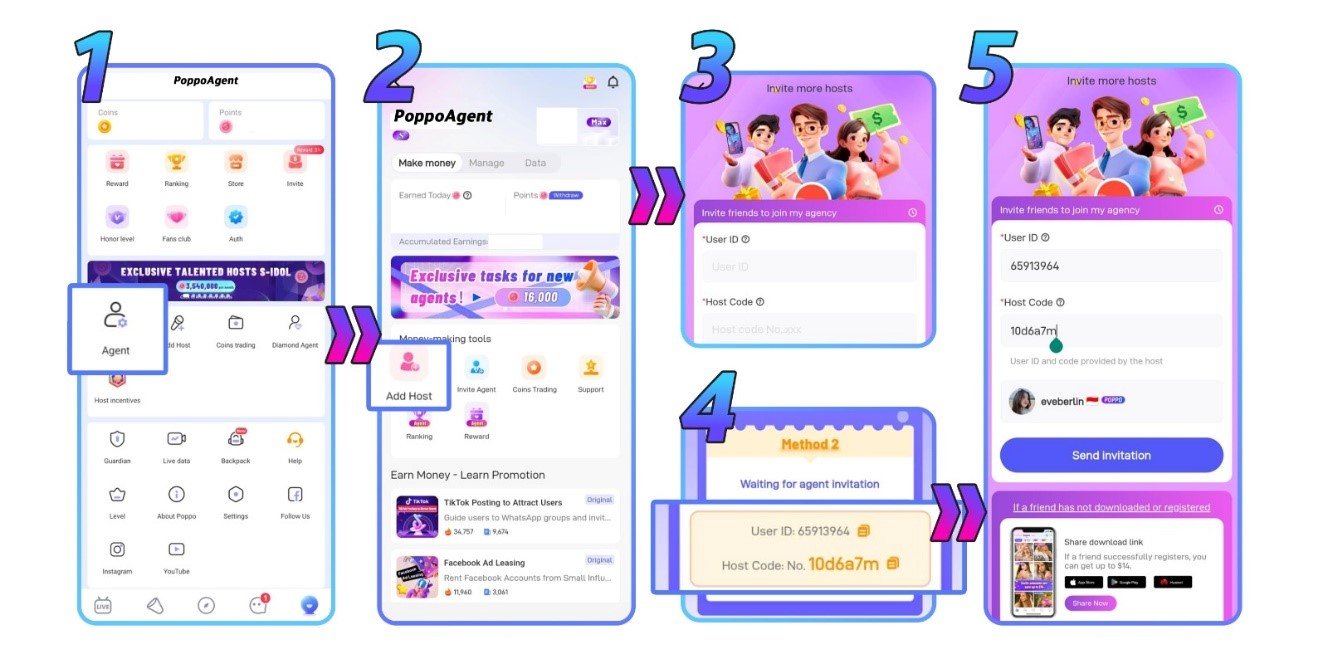
- Open Your ‘Agent’ Menu
Start by opening your profile and locating the ‘Agent’ menu in the middle of the screen. Tap it to continue.
- Tap the ‘Add Host’ Button
Once inside the ‘Agent’ menu, tap the ‘Add Host’ button found in the center of the screen.
- Enter the Host’s ID and Code
You’ll need to get the host’s ID and code directly from them before filling in this step. Enter both details into the provided fields.
- Example of Host’s ID and Code
Take a look at the image below to see the example. - Send the Invitation
With the ID and code entered, tap the ‘Send Invitation’ button to forward the invite to your potential host.
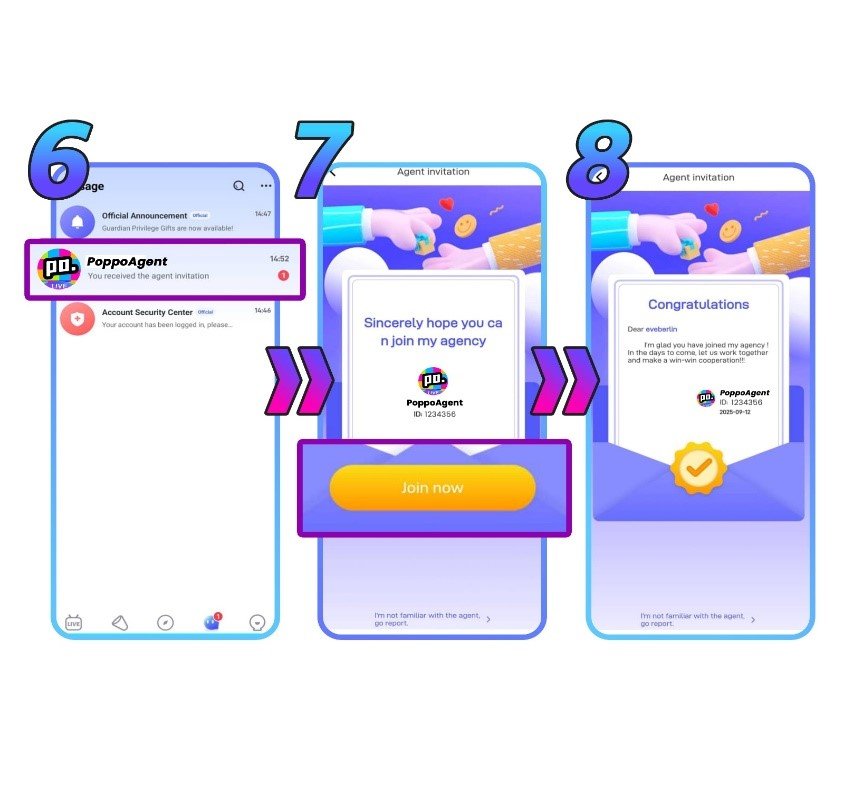
- The Host Receives the Invitation
The host will get a notification and invitation message directly in their Poppo Live app.
- The Host Accepts or Declines
At this point, the decision is theirs. The host can either accept or decline your invitation.
- Welcome Your Newest Host!
If they accept, congratulations, they’re now officially part of your agency and you can start growing together on Poppo Live!
Host Invitation Common Problems & Solutions
- I invited a host but they weren’t able to join my agency
This usually comes down to one of two things — either the host’s ID or code was entered incorrectly, or the host is already a member of another agency. Double-check the details with your host and try again if needed.
- I want to recruit a host who’s currently in another agency
Unfortunately, this isn’t possible right away. You’ll need to wait until the host has officially left their current agency before you can send them an invitation to join yours.
Poppo Live Invite Host Frequently Asked Questions
- Are there any requirements I need to meet as an agent?
Yes, there are performance targets in place covering both recruitment and your team’s overall activity level. If your hosts and sub-agents remain inactive for an entire month, your agency risks being closed and all members will be reassigned under the platform’s official agency. Since these requirements are subject to change, it’s best to get in touch with our team for the most up-to-date details.
- What if I don’t have the host’s ID or code?
Both pieces of information are required to send an invitation. Reach out to the host directly to obtain their ID and code before proceeding.
Start Building Your Agency Today
That covers everything you need to know about inviting hosts to your Poppo Live agency. Keep in mind that your growth as an agent, both in community and income, is directly tied to how many active hosts you bring on board, so don’t be shy about getting the word out.
Have questions about the Poppo Live invite host process or anything else related to being a Poppo Live agent? Our team is always here and happy to help, reach out anytime or visit our blog.