

Poppo Live, which launched in 2022, has quickly established itself as a popular platform for livestreaming. Today, its community extends to more than 150 countries, attracting people who want to become Poppo live host and connect with audiences worldwide. Hosts can use the platform to showcase their talents, share their everyday experiences, or simply engage in conversations with viewers. No matter what type of content you enjoy creating, Poppo Live offers opportunities to connect with an audience that matches your interests. This guide will take you through the entire process, from setting up your account and starting your journey as a host to finding and joining an agency.
What Should You Do First?
- Get the Poppo Live App
Visit the App Store or Google Play and search for Poppo Live. Download the app, open it, and proceed to the registration or login page.
- Sign Up for an Account
Create your account with your phone number, Facebook, or Google account. You can also register by entering your details manually. Remember that accounts that have already been registered cannot be signed up again.

- Add the Referral Code
When prompted, enter 4345306 in the referral code section and select Enter.
That’s it! Your account is successfully registered! Before starting your first livestream, take a moment to complete your profile. Adding suitable tags and a brief introduction can help viewers discover you and encourage them to follow. After that, you can start streaming on your own or choose to join an agency.
Why Should You Complete Face Verification?
Your profile is the first step toward becoming a successful host, but verifying your identity can help make your account more trustworthy. Completing face authentication also allows you to prepare your account before going live and start building your audience with greater confidence. Here’s how to complete the verification:
Step 1: Go to your profile.

Step 2: Scroll down until you see “Authentication.”

Step 3: Select “Face Authentication.”

Step 4: Face the camera and make sure your face is clearly visible, then click “Start to Certificate” to start the authentication.
On this step, the app will show several instructions for you to follow, such as taking at selfie, blinking, and turning your head from left to right.
What to Keep in Mind During Face Verification
- Choose the Right Background
Make sure you are in a well-lit area before starting the verification. Avoid backgrounds that are too bright or too dark, and watch out for strong backlighting. A clear and balanced background can help ensure your face is detected accurately.
- Position Yourself Correctly
Face the camera directly and keep your face centered within the frame. Follow the on-screen instructions carefully, whether you are asked to blink, turn your head, or smile. Stay in position and move only when prompted.
How to Find the Right Agency on Poppo Live
Working with an agency can make your livestreaming journey easier by giving you access to additional support and opportunities. To connect with an agency, simply follow the steps below:
Step 1: Visit Your Profile
Open your profile and go to your account settings.
Step 2: Find “My Agency”
Scroll down the settings page and tap “My Agency.”

Step 3: Choose How You Want to Join
Next, select the available joining method that works best for you.
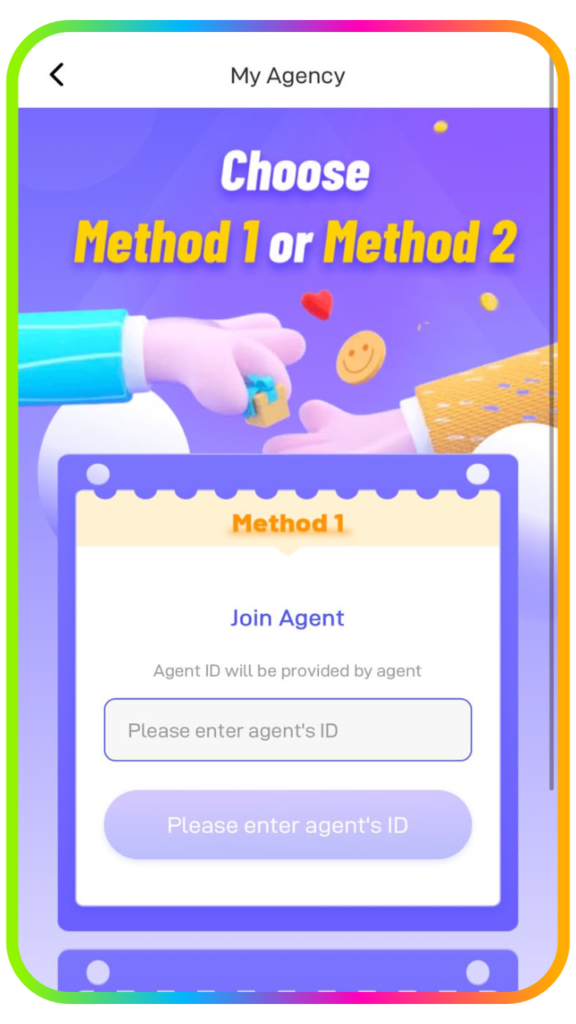
Step 4: Enter an Agent ID or Share Your Host ID
Put your Agent ID (4345306), enter it in the required field, and join the agency instantly and start your livestream. Also, you can share your Host ID with the agencies on Poppo Live and wait for the invitation on your account.
Frequently Asked Questions
- What should I check when face authentication is unsuccessful?
Start by finding a place where your face can be captured clearly without excessive shadows or glare. Make sure the lighting is balanced and avoid standing directly in front of a strong light source. Keep your face within the center of the frame and respond to every action requested during the verification, such as looking around, blinking, or smiling.
- When should I expect my account to be verified?
Poppo Live may need 1–3 business days to complete the verification review. You can revisit your account once three days have passed to see the outcome. If approved, your profile will receive verified host status; if not, you can submit another verification attempt.
- Can one account be connected to several agencies?
No. An account may only maintain an affiliation with a single agency at any given time.
- What steps should I follow to go live?
Open your profile, then select Streamer Center to access the broadcasting section. Add a suitable livestream title and relevant tags before starting so viewers who are interested in your content can discover your stream more easily.
- When can I change my username?
Poppo Live allows new users to modify their username two times within their first 7 days. Following that period, the nickname can be updated once a month.
Start Your Own Livestream Account
So, you’re now ready to take the next step as a Poppo Live Host. Once your account has been verified, you can start broadcasting, connecting with viewers, and growing your audience. Keep streaming regularly, make use of the platform’s available features, and enjoy the experience with confidence.
Want to discover more? Browse our other articles on this link for practical tips and guides designed to help you get the most out of Poppo Live. Join us now by sending us a message on this link or build your agency here.